MDF & IDF Infrastructure
Main Distribution Frames (MDFs) and Intermediate Distribution Frames (IDFs) are critical connection points within an organization’s IT infrastructure. These spaces support the network equipment, cabling, power, cooling, monitoring, and physical infrastructure required to keep users and connected systems online.
Whether you are designing a new MDF or IDF, upgrading an existing network closet, or standardizing infrastructure across multiple locations, proper planning can improve reliability, simplify management, and provide room for future growth.

What is an MDF?
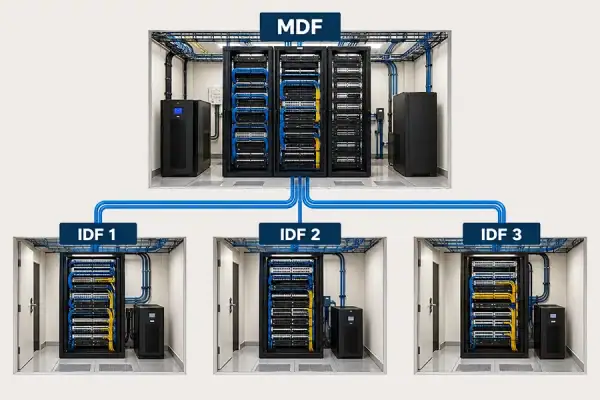
A Main Distribution Frame (MDF) is the primary telecommunications and network distribution point within a building or facility. It typically serves as the central connection between incoming service-provider connections, core network infrastructure, and the IDFs located throughout the building.
Depending on the facility, an MDF may contain:
– Network and telecommunications equipment
– Server and network racks
– Patch panels and cable management
– UPS systems and backup power
– Rack power distribution
– Environmental monitoring
– Cooling and airflow management
– Physical security and access control
Because the MDF often supports connectivity throughout an entire facility, power availability, equipment protection, environmental conditions, security, and capacity for future expansion should all be considered during design.
What is an IDF?
An Intermediate Distribution Frame (IDF) is a secondary network distribution point that extends connectivity from the MDF to users, devices, and systems located throughout a building.
IDFs are commonly located on individual floors, wings, departments, or other areas where network connections need to be distributed closer to the devices they support.
An IDF may include:
– Network switches
– Patch panels
– Fiber and copper cabling
– Racks or wall-mount enclosures
– UPS systems
– Rack PDUs
– Cable management
– Environmental monitoring
– Cooling or ventilation
– Physical security
Although IDFs are often smaller than the main equipment room, the infrastructure supporting them is no less important. Power interruptions, excessive temperatures, poor airflow, or unauthorized access within an IDF can affect every device connected through that space.
MDF vs. IDF: What’s the difference?
The main difference between an MDF and an IDF is their role within the network. The MDF serves as the primary network distribution point for a building or facility, while an IDF extends connectivity from the MDF to users and devices in specific floors, departments, wings, or other areas.
MDF
Main Distribution Frame
IDF
Intermediate Distribution Frame
Primary role
Main network distribution point
Primary role
Extends network connectivity from the MDF
Typical location
Central telecommunications or network room
Typical location
Floors, wings, departments, or other areas throughout the facility
Connectivity
Connects incoming services, core network infrastructure, and IDFs throughout the facility
Connectivity
Connects back to the MDF and distributes network connectivity locally
Typical equipment
Core network equipment, racks, UPS systems, PDUs, patching, cable management, and monitoring
Typical equipment
Switches, patch panels, racks or enclosures, UPS systems, PDUs, cable management, and monitoring
Infrastructure priority
Facility-wide reliability, capacity, resiliency, and future growth
Infrastructure priority
Reliable localized connectivity, power, cooling, monitoring, and remote visibility
The number and configuration of MDFs and IDFs depend on the size, layout, network architecture, equipment requirements, and operational needs of the facility.
What Infrastructure Does an MDF or IDF Need?
The network equipment inside an MDF or IDF depends on the environment, but reliable operation also depends on the physical infrastructure supporting that equipment.
Power Protection and Distribution
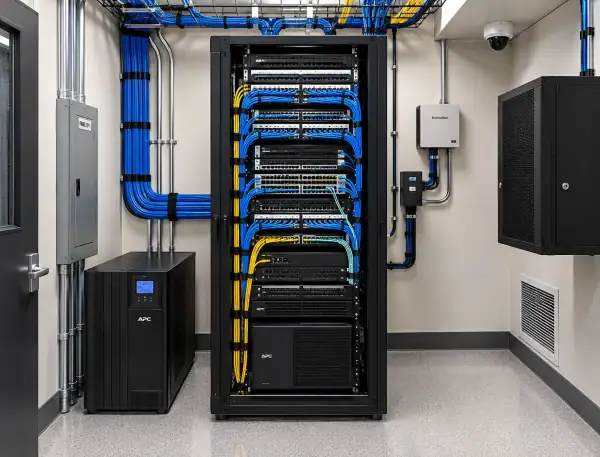
Network equipment requires reliable, properly sized power. UPS systems can provide backup power during outages and help protect equipment from power disturbances, while rack PDUs distribute power to equipment within the rack.
Power planning should consider current load, available capacity, redundancy requirements, backup runtime, equipment growth, and future technology needs.
Cooling and Airflow
Network switches and other IT equipment generate heat, even in relatively small telecommunications rooms.
Cooling requirements vary based on equipment density, room size, ventilation, surrounding conditions, and heat load. Some spaces may operate effectively with proper ventilation and airflow management, while higher-density MDFs and IDFs may require dedicated cooling.
Understanding actual environmental conditions is important before determining the appropriate approach.
Racks, Enclosures and Cable Management
Proper rack sizing and cable management help protect equipment, improve serviceability, maintain airflow, and provide room for expansion.
MDF and IDF planning should account for equipment dimensions, cable pathways, power distribution, access requirements, rack capacity, and anticipated growth rather than simply accommodating today’s equipment.
Environmental Monitoring
A network closet can experience changing environmental conditions without anyone being physically present to notice them.
Environmental monitoring can provide visibility into conditions such as:
– Temperature
– Humidity
– Water or fluid leaks
– Airflow and air pressure
– Power conditions
– Door status and other physical conditions
Alerts can help IT and facilities teams identify developing conditions before they contribute to equipment failure or downtime.
Physical Security
MDFs and IDFs provide access to critical network infrastructure and should be protected accordingly.
Depending on the environment, physical security may include controlled room access, locking racks or cabinets, electronic rack access, door monitoring, and video surveillance.
Remote Access and Management
Organizations with multiple facilities or distributed IT environments may also need the ability to access and troubleshoot network equipment remotely.
Out-of-band management, console servers, KVM-over-IP, and centralized device management can provide access to critical equipment even when the primary network is unavailable.
MDF & IDF Best Practices
A well-planned MDF or IDF should support both current requirements and future infrastructure changes.
Consider these best practices when designing or upgrading an MDF or IDF:
– Size racks and enclosures for current equipment and future expansion.
– Maintain organized cable pathways and cable management.
– Evaluate UPS capacity, runtime, and power redundancy requirements.
– Monitor temperature and other environmental conditions.
– Maintain proper ventilation, airflow, and cooling.
– Secure rooms, racks, and cabinets from unauthorized access.
– Keep equipment and surrounding spaces clean and free of unnecessary obstructions.
– Document equipment, circuits, connections, and infrastructure changes.
– Periodically review power, cooling, rack capacity, and environmental conditions as equipment is added or replaced.
MDF and IDF environments should be treated as part of the organization’s critical IT infrastructure rather than simply as rooms or closets that house network equipment.
Common MDF & IDF Infrastructure Problems
Many MDF and IDF issues develop gradually as equipment is added, networks expand, and infrastructure requirements change.
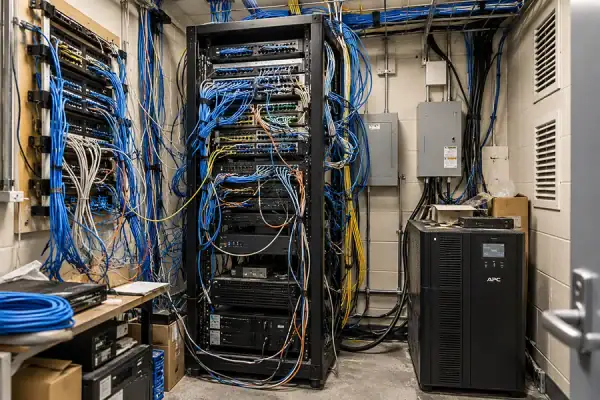 Common problems include:
– UPS systems operating near or beyond recommended capacity
– Insufficient backup runtime
– Heat buildup or inadequate ventilation
– Poor airflow within racks or enclosures
– Cable congestion
– Limited rack capacity
– Lack of environmental monitoring
– Inadequate power monitoring
– Unsecured rooms, racks, or cabinets
– Poor documentation
– Equipment added without evaluating available power or cooling capacity
– Limited room for future expansion
A periodic review of MDF and IDF infrastructure can identify capacity, reliability, and environmental concerns before they become larger operational problems.
Standardizing MDF & IDF Infrastructure Across Multiple Locations
Managing one network closet is very different from managing dozens or hundreds across multiple facilities.
Schools, healthcare organizations, manufacturers, government agencies, financial institutions, retailers, and other distributed organizations may benefit from establishing consistent MDF and IDF infrastructure standards.
Standardization can address areas such as:
– Rack and enclosure configurations
– UPS sizing and backup runtime
– Power distribution
– Environmental monitoring
– Cooling and airflow
– Cable management
– Physical security
– Equipment labeling and documentation
– Remote access
– Capacity and expansion planning
Creating repeatable infrastructure standards can make distributed environments easier to deploy, support, monitor, and expand while reducing inconsistencies between locations.
Planning for Changing IT Requirements
MDF and IDF environments are supporting more than traditional user connectivity.
Wireless networks, IoT devices, security systems, building technologies, edge computing, automation, AI-enabled applications, and other connected systems can increase the demands placed on distributed IT infrastructure.
That does not mean every MDF or IDF needs to become a high-density environment. It does mean organizations should understand how changing equipment requirements may affect available power, cooling, rack capacity, connectivity, and environmental conditions.
Planning for these requirements early can reduce the need for reactive infrastructure changes later.
How JEM Tech Group Supports MDF & IDF Environments
JEM Tech Group helps organizations design, upgrade, standardize, and support the physical infrastructure surrounding critical network equipment.
As a vendor-neutral infrastructure solutions provider with nearly 50 years of experience, JEM can help evaluate requirements and identify solutions based on the needs of the environment rather than a single manufacturer’s product line.
Our MDF and IDF capabilities include:
– UPS and backup power
– Rack power distribution
– Racks and enclosures
– Cooling and airflow management
– Environmental monitoring
– Physical security
– KVM and out-of-band management
– Cable management
– Infrastructure assessments
– Design and specification support
– Installation and integration
– Testing and commissioning
– Multi-site infrastructure standardization
Based in Michigan and supporting organizations nationwide, JEM works with IT and facilities teams across data centers, MDFs and IDFs, edge environments, remote sites, and other mission-critical IT spaces.
MDF & IDF Frequently Asked Questions
Does an IDF need a UPS?
A UPS can help keep network equipment operating during short power interruptions while protecting equipment from certain power disturbances. UPS capacity and runtime should be based on the equipment load, desired backup time, redundancy requirements, and operational importance of the devices being supported.
Does an IDF need cooling?
Not every IDF requires dedicated cooling. Cooling requirements depend on equipment heat load, room size, ventilation, equipment density, and surrounding environmental conditions. Monitoring temperature can help determine whether existing ventilation or cooling is sufficient.
How should an MDF or IDF be monitored?
Environmental monitoring can provide visibility into temperature, humidity, leaks, airflow, power conditions, door status, and other conditions that could affect IT equipment. Alerts can allow teams to respond to abnormal conditions without relying on someone being physically present.
What equipment is typically found in an IDF?
IDFs commonly contain network switches, patch panels, fiber and copper cabling, racks or enclosures, UPS systems, rack PDUs, and cable management. Monitoring, cooling, physical security, and remote-management technologies may also be used depending on the environment.
How can an older MDF or IDF be modernized?
Modernization should begin with an assessment of the existing equipment and supporting infrastructure. Power capacity, UPS condition, cooling and airflow, rack space, cabling, environmental monitoring, security, and future equipment requirements should all be considered before determining which improvements are necessary.
Should MDF and IDF rooms have redundant power?
Redundancy depends on the criticality of the equipment and the organization’s uptime requirements. Critical environments may benefit from redundant power paths, UPS protection, dual-corded equipment, or other resiliency measures.
How much room should be planned for future growth?
There is no single amount of additional capacity appropriate for every MDF or IDF. Planning should consider expected network growth, equipment refresh cycles, additional connected devices, power availability, cooling capacity, rack space, and cable pathways. Designing only for today’s equipment can make future upgrades more difficult and expensive.
Build or Upgrade Your MDF & IDF Infrastructure
Whether you are planning a new network environment, addressing power or cooling concerns, modernizing older telecommunications rooms, or developing consistent standards across multiple locations, JEM Tech Group can help evaluate the physical infrastructure supporting your network.
Talk with JEM about your MDF or IDF requirements.
View or download our Network/Telecommunications Capabilities flyer.